Extension not working?

99% of the time it's one of these. Work down the list. Most people are fixed by step 1.

1

The shortcut does nothing when I press it

This is the big one.Chrome doesn't always bind Ctrl+Shift+Fon install. If any other extension already claims it, Chrome silently leaves JustFixMe's shortcut empty.

Fix it:

  1. Open Chrome's shortcut settings: chrome://extensions/shortcutsClick the URL to copy it, then paste into your address bar (Chrome blocks direct links to chrome:// pages).
  2. Find JustFixMe in the list, click the pencil icon next to Fix typos in the selected text.
  3. Press Ctrl + Shift + F (or + + F on Mac). Close the tab.
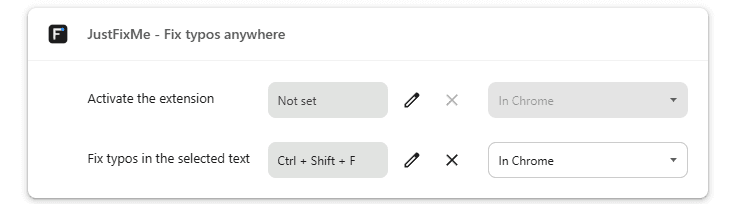
The JustFixMe row in chrome://extensions/shortcuts with Ctrl + Shift + F set on the 'Fix typos in the selected text' command
This is what it should look like once the shortcut is set: Ctrl + Shift + F bound to Fix typos in the selected text.
2

The popup says “Not connected”

The extension needs a one-time pairing code to talk to your account.

  1. Go to justfixme.app/account/pair and click Generate code.
  2. Paste the 6-character code into the popup. The dash is optional.
  3. Codes expire in 5 minutes. If yours is invalid, just generate a fresh one.
3

Works on most sites, but not this one

A few pages don't let any extension read your selection. Chrome's rule, not ours:

  • Chrome internal pages: chrome://, the new-tab page, the Web Store.
  • PDFsin Chrome's built-in viewer.
  • Google Docs:text is drawn on a canvas, so we can't read or replace it inline. (Same for Sheets and Slides.)

Workaround: click the JustFixMe icon, paste your text into the popup, hit Fix & copy. One Ctrl+V away from where you needed it.

4

“Incorrect API key” or 401 error

  • BYOK plan: check your key on the key page. Real keys start with sk- (e.g. sk-proj-…). Most common slip: missing the leading s from copy-paste.
  • AI Included plan: re-pair the extension once from /account/pair. Still failing? That's a bug. Email us.
5

The icon isn't in my toolbar

Chrome hides extension icons by default. Click the puzzle-piece button in the toolbar, find JustFixMe, and click the pin icon next to it.

Not in the puzzle-piece list either? Open chrome://extensions and confirm JustFixMe is there and toggled on.